Summer internship at about.me

Laura Helen Winn is a user experience and visual designer based out of Tennessee. 

At the beginning of May, I moved to San Francisco from Tennessee to intern at about.me. My goal: to learn from a team of experts and work on a product I already used and loved. I brought a range of skills to the table with the intent to narrow my focus. The question in mind was, “Who am I: UX designer, visual designer, developer?”

Visual Design
Web design, interface design, visual design, pushing pixels – whatever you want to call it, that’s what I do. I’m stoked that I’ve been working with Shawn Collins, lead designer of the product. His attention to detail and honest critiques have helped me become a better designer, hands down.

Development
About.me is built and maintained by an amazing group of developers. So amazing that I realized I’m better off knowing as much about front-end development as I want to without making it my main focus. I know enough HTML and CSS to develop prototypes, and to design interfaces that will be easy to code and easy to use. As a designer, I consider this a major strength. Being able to think through the process of what you’re designing helps you, your team and your users.

UX
User experience design became my main focus this summer, and I worked closely with Ryan Freitas to develop new product features from scratch. I’ve grown attached to the process of gathering copy, building an information architecture, and communicating the features to developers. UX keeps the process of building features clean and helps communicate ideas without the distractions of color, typography and even layout. And, thanks to our support with AOL, we A/B test frequently. It’s nice to have the numbers to influence visual designs and copy.

I’m admittedly smitten with the Bay Area, and feel fortunate that I’ve spent my summer here. I’m heading home to finish school, and look forward to continuing work with the about.me team. We’re planning to release features that we’re all excited about, and know you will be too.

Around the world with about.me

I love exploring the about.me profiles that are shared from around the world. Chrome has a handy in browser translator that lets me view the text in English, or I can try to determine their interests from their background.

In the above profile, Doğaç (Turkish) is an amateur photographer and student studying architecture.

Continue Reading

Making about.me about so much more (2)

Becky Straw is the Co-Founder and Chief Adventurist of The Adventure Project. You can read her first post here.

Last May, The Bill and Melinda Gates Foundation posted a challenge, asking for the best examples of how to raise awareness about small farmers in Africa.  Our organization, The Adventure Project, was already working with small farmers in Kenya. So we knew this is was a great opportunity to engage our supporters and amplify our message.

Continue Reading

Using your stats

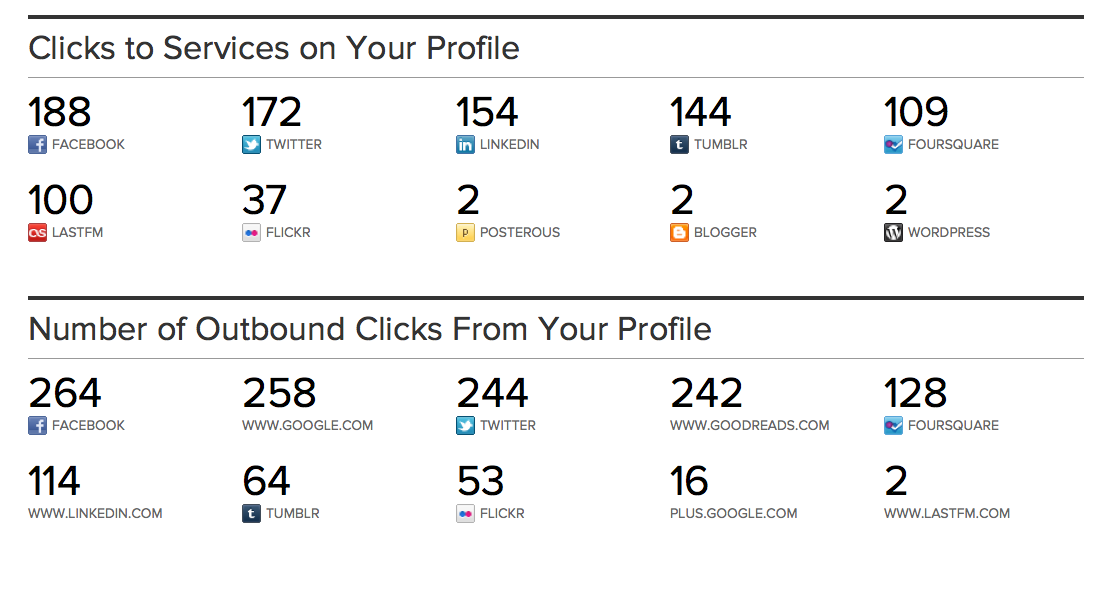
Stats can be fun to look at, but how can they help? The stats we provide can help you target for your audience and channel where they go.  You can see where people are going in order to learn more about you.  For me, it’s Facebook, Twitter and LinkedIn, though a lot of people are checking out GoodReads and Tumblr as well.

Given this information, I should spruce up my profiles at those locations, make sure they’re consistent and up to date. I might also consider moving around the icons or adding further links in my bio, if I want to drive traffic more to another place.  Finally, I can reconsider the information I provide here – perhaps I should mention my favorite books in my bio as it seems to be something visitors are interested in.

What about you?


We created a video with some of our favorite profiles. It’s currently playing in cabs in NYC, Boston and Chicago. If you see one, share a picture with us here or on Twitter and we’ll send you a code for some free Moo products!

Get your page in shape with Fitbit

Track and share your activity – and show off your achievements on your about.me splash page. The Fitbit “accurately tracks your calories burned, steps taken, distance traveled and sleep quality. The Fitbit tracks your motion in three dimensions and converts this into useful information about your daily activities.”

We let you display your activity from the past five days as well as your all time best for things like: number of steps, calories burned, and most active day. So if you have Fitbit, flaunt it!

Coco Rocha!

Being a model can help when creating a background, but what we love about Coco Rocha’s splash page is how it reflects her personality.  She’s not only a model, but a dancer and blogger – all of which is clear. We’re not her only fans, she’s featured at mail.aol.com today too!

The good fight

One of my favorite profiles I found this week, Milly does a little bit of everything, but focuses on her personal endeavors.  She’s a student activist, but also a musician – with a stellar background image to boot.  Click through and take a look around!

Backgrounds brought to you by AOL Artists

As you may have seen, we stocked up some new default backgrounds for you to choose from, if your personal background image isn’t quite ready.  These backgrounds are part of a larger collection by AOL Artists.

According to Nikki Macaluso, Manager of the AOL Artists program:

AOL is dedicated to creativity and supporting the artistic community by actively commissioning artists from around the world. We are showcasing their work globally and our artist community is growing daily as we continue to discover talented individuals to work with. AOLArtists.com was launched in May 2010 to showcase this incredible talent. We have worked with 83 artists and commissioned 219 pieces of art as canvases to be featured attached to our brand identity. With the AOL Artists program, we are empowering artists, creativity and innovation.

To learn more about the backgrounds and the artists who created them, head to AOLArtists.com.

How to: Add and edit custom URLs

One of my favorite features we offer is the ability to add and customize URLs. Below, I’ll show you how to do this with my Google plus account.  Because G+ has no API or RSS (yet) a custom URL is the best way to add it to your page.

First, click the “Add a Site” button on your page. Then choose the Add a URL option.

When prompted, add the URL you’d like and confirm. You can see I added my Google Plus profile URL.

Finally, click the pencil in your list of URLs, to edit the text used for the link.  I chose G+ for mine. And you can see the final product at my page.

No more posts.